Spot color
Logos, lettering, and artwork with distinct ink colors.
Keep your ink palette intentional.
BUILT FOR SCREEN PRINTERS
Your artwork. Your inks.
Ready for the next print.
Separate artwork for T-shirts, posters, and apparel right in your browser. Create spot color, simulated process, and CMYK channels—without Photoshop or plugins.
Ready, Sep, Go,™
No installation. Works on Desktop and Mobile.
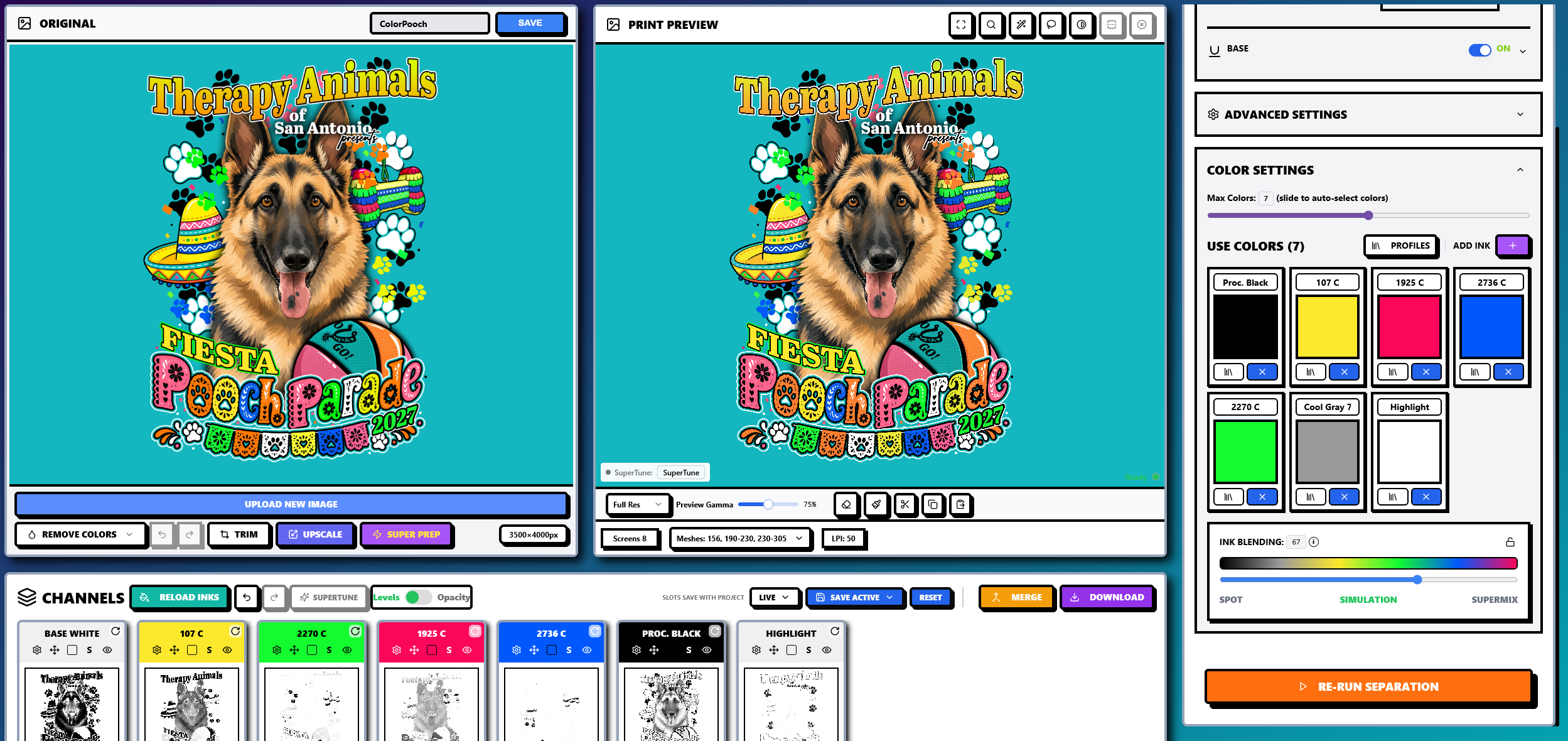
FROM ARTWORK TO OUTPUT
A practical prepress workflow, from the first upload to the files you take to your RIP or screen room.
Start with your design. Bring in PNG, JPG, SVG, PDF, and other supported artwork formats.
Choose your separation method, preview on your garment color, and adjust channels, base, and highlights.
Download separated channels or EPS DCS 2.0, with halftone RIP options for film output.
MATCH THE METHOD TO THE ART
From a clean shop logo to a detailed full-color illustration, choose the approach that fits the print.
Logos, lettering, and artwork with distinct ink colors.
Keep your ink palette intentional.
Detailed illustrations, blended colors, and gradients.
Bring full-color art to dark garments.
Process printing with cyan, magenta, yellow, and black.
A familiar workflow for light garments.
White underbase supports dark garments; highlight white brings definition to the brightest areas.
THE PRINT FUNDAMENTALS
Online color separation for screen printing breaks a full-color design into individual ink channels, or plates, using a browser-based tool. Each channel represents ink to print through a separate screen.
InkSplit analyzes your artwork and helps create spot color channels, simulated process separations, white underbase, highlight white, or CMYK plates. Review and refine the result before exporting for your production workflow.
That means you can prepare separations for T-shirts, posters, and apparel without installing desktop software or tracing every channel by hand.
Watch the workflowINK ON FABRIC
Explore Clark Automotive: six screens, blended colors, and fine detail on a black shirt.
Explore real printsBEFORE YOUR FIRST SEPARATION
Everything starts with your artwork.
Online color separation is the process of converting a full-color image into separate color channels (plates) using a web-based tool, without needing to install desktop software like Photoshop. It prepares your artwork for burning onto individual screens.
InkSplit analyzes your uploaded artwork and generates spot color, simulated process, or CMYK channels. You can preview the result, adjust individual channels, and use white underbase and highlight white controls to prepare the separation for your print workflow.
No. InkSplit is a standalone browser-based tool. Upload your artwork and export EPS DCS 2.0 files or separated image channels without opening Photoshop.
Spot color works well for artwork with distinct ink colors. Simulated process is useful for detailed illustrations and gradients, especially on dark garments. CMYK uses cyan, magenta, yellow, and black for process printing, typically on light garments.
InkSplit supports EPS DCS 2.0 and separated image channels, with halftone RIP options for film output. Choose the format that fits your RIP or screen-making workflow. Available downloads depend on your plan or credits.
YOUR NEXT PRINT STARTS HERE
Open InkSplit and get your artwork into channels.